meta data for this page
This is an old revision of the document!
The ICE-D WFS
A WFS service provided by a Geoserver installation allows display and analysis of ICE-D exposure age data within desktop GIS software such as ArcGIS and QGIS. This means that whenever there are updates to the data in ICE-D (e.g., users add new data to ICE-D), the WFS also gets updated and so as long as you have an internet connection, you will be viewing the latest and most up-to-date account of samples in ICE-D in your own personal desktop application!
Connecting to the ICE-D WFS
Connecting in QGIS:
In the QGIS “browser” panel (can be shown on the page by navigating to view → panel → and selecting “browser”) one of the options for layers to add to any map is the “WFS / OGC API - features” option. Right click that option and select “New Connection…”
The new connection window should look like this:
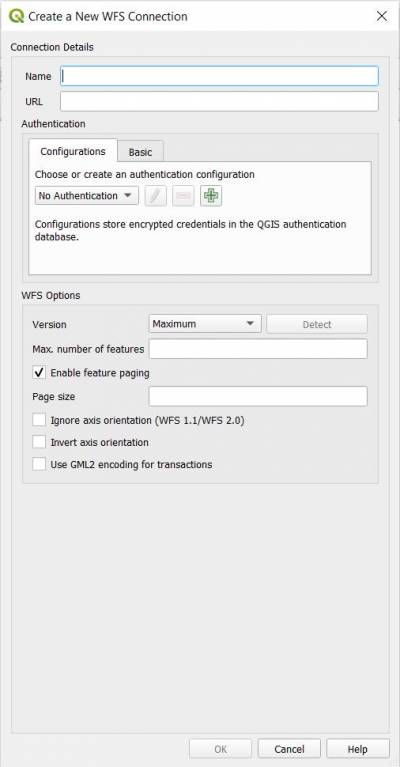
Name the connection whatever you like, I named mine iced.
In the URL line, add in the following URL:
https://geoserver.ice-d.org/geoserver/wfs?version=2.0.0
This link establishes a connection between your desktop GIS application and all of the ICE-D data stored as a Web Feature Service (WFS) hosted online by Geoserver. Before selecting OK, be sure to check the box stating “Invert axis orientation. Otherwise QGIS will think latitude values are longitude values and vice versa and all of your sample locations will be rotated 90 degrees.
Once you select OK, there should be a new drop down menu below
Explanation of relationship between ICE-D applications and WFS layers
Explain this here
Explanation of attribute data
Explain what the attributes are here